> ## Documentation Index
> Fetch the complete documentation index at: https://docs.flipsuite.xyz/llms.txt
> Use this file to discover all available pages before exploring further.
# Profile
> Learn more about the /profile command.
## Overview
You can use `/profile` command to view your Flipsuite profile.
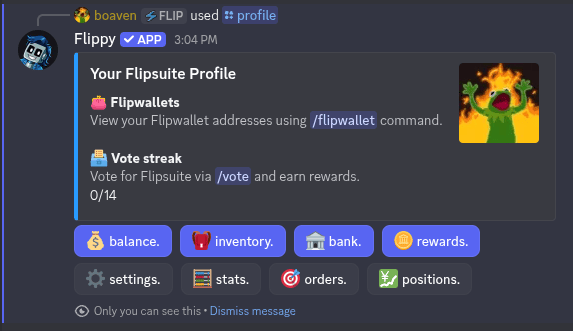 In your profile, you can:
1. View temporary roles in servers
2. View your [vote](/flippy/commands/vote) streak
3. Quickly access your [balance](/flippy/commands/balance), [inventory](/flippy/commands/inventory), [bank](/flippy/bank) and [rewards](/flippy/commands/rewards)
4. Enter your profile settings
5. View your profile stats
6. Quickly access your [limit orders](/modules/trading/commands/orders) and [open positions](/modules/trading/commands/positions)
## Settings
In your profile, you can:
1. View temporary roles in servers
2. View your [vote](/flippy/commands/vote) streak
3. Quickly access your [balance](/flippy/commands/balance), [inventory](/flippy/commands/inventory), [bank](/flippy/bank) and [rewards](/flippy/commands/rewards)
4. Enter your profile settings
5. View your profile stats
6. Quickly access your [limit orders](/modules/trading/commands/orders) and [open positions](/modules/trading/commands/positions)
## Settings
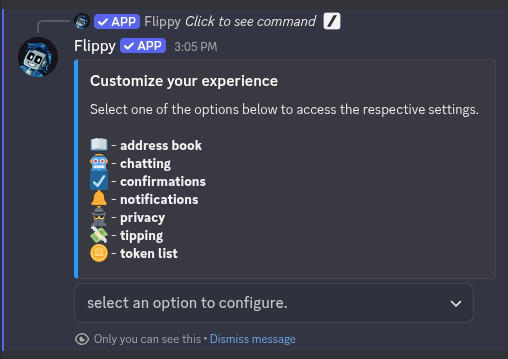 In your profile settings, you can do the following:
1. Manage your address book
2. Disable chatting with Flippy
3. Disable confirmations for certain actions
4. Manage notification settings
5. Manage your privacy settings
6. Manage your tipping settings
7. Add tokens to your custom token list
### 1. Address book
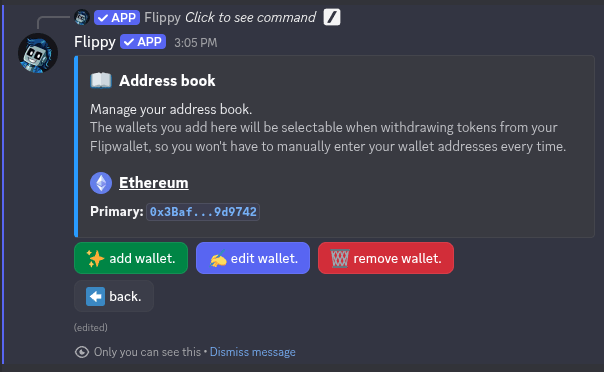
In the address book settings, you can save wallets that you often use so you don't have to enter them every time.
You will be able to quickly access them when withdrawing tokens from your Flipwallet, claiming rewards, submitting
wallets to whitelists and much more.
In your profile settings, you can do the following:
1. Manage your address book
2. Disable chatting with Flippy
3. Disable confirmations for certain actions
4. Manage notification settings
5. Manage your privacy settings
6. Manage your tipping settings
7. Add tokens to your custom token list
### 1. Address book
In the address book settings, you can save wallets that you often use so you don't have to enter them every time.
You will be able to quickly access them when withdrawing tokens from your Flipwallet, claiming rewards, submitting
wallets to whitelists and much more.
 ### 2. Chatting settings
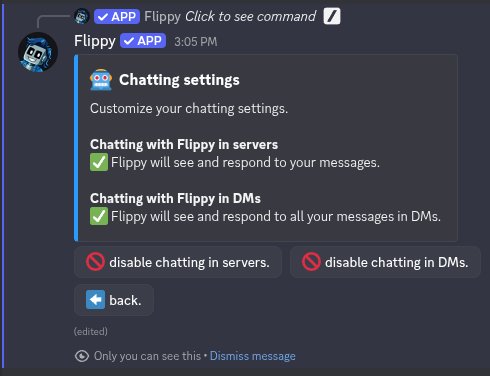
In chatting settings you can disable chatting with Flippy. By disabling this option Flippy won't see and won't
respond to your messages in Discord.
### 2. Chatting settings
In chatting settings you can disable chatting with Flippy. By disabling this option Flippy won't see and won't
respond to your messages in Discord.
 ### 3. Confirmation settings
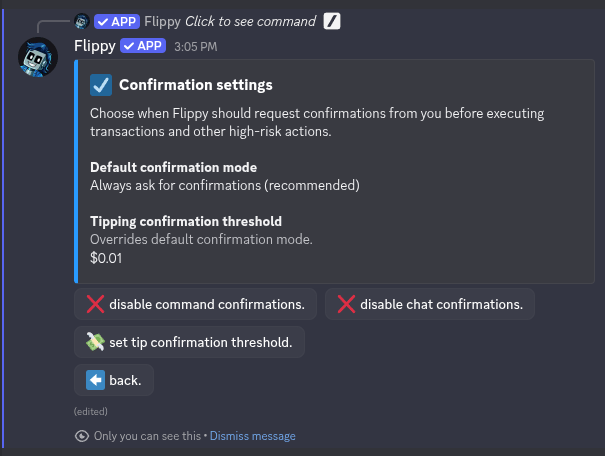
In the confirmation settings menu you can:
* Set confirmation mode (always, command only, chat only, or none)
* Set confirmation threshold for transfers (applies to tips, airdrops and raffles)
### 3. Confirmation settings
In the confirmation settings menu you can:
* Set confirmation mode (always, command only, chat only, or none)
* Set confirmation threshold for transfers (applies to tips, airdrops and raffles)
 Disabling confirmations when chatting with Flippy is not recommended. Due to its agentic
nature, it may and **probably will** occasionally make mistakes. Confirmations are the only
step guarding you from unwanted transactions.
### 4. Notification settings
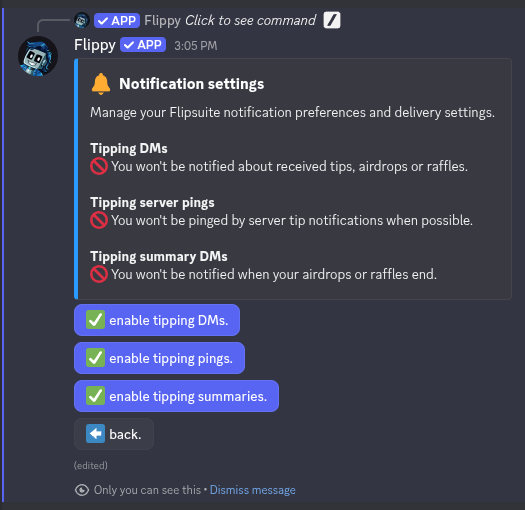
In the notification settings menu you can opt out from specific tip notifications or pings.
Disabling confirmations when chatting with Flippy is not recommended. Due to its agentic
nature, it may and **probably will** occasionally make mistakes. Confirmations are the only
step guarding you from unwanted transactions.
### 4. Notification settings
In the notification settings menu you can opt out from specific tip notifications or pings.
 ### 5. Privacy settings
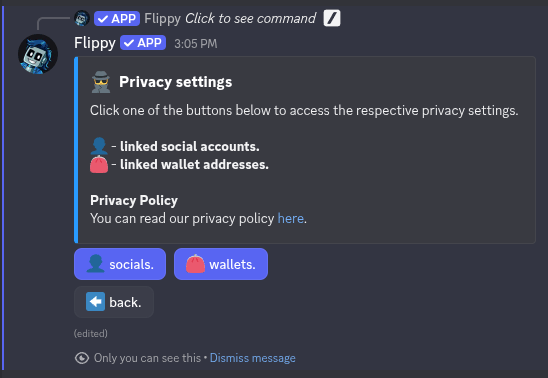
In privacy settings you can decide what information about socials and wallets linked to your account is shared with
servers you verify in. Each option can be enabled/disabled either globally for all servers or on a per-server basis.
### 5. Privacy settings
In privacy settings you can decide what information about socials and wallets linked to your account is shared with
servers you verify in. Each option can be enabled/disabled either globally for all servers or on a per-server basis.
 ### 6. Tipping settings
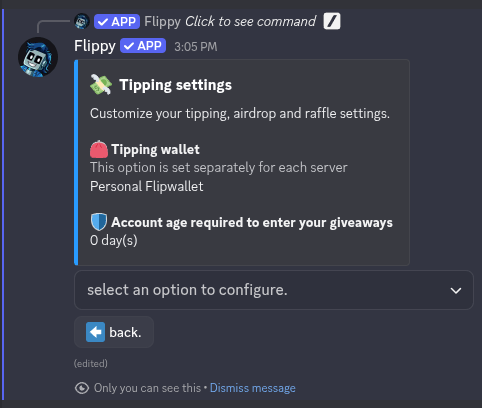
In tipping settings you can configure the minimum account age that's required to enter your airdrops and raffles, and
change the wallet to use for tipping (see [shared tipping wallets](/modules/tipping/shared-wallet)).
### 6. Tipping settings
In tipping settings you can configure the minimum account age that's required to enter your airdrops and raffles, and
change the wallet to use for tipping (see [shared tipping wallets](/modules/tipping/shared-wallet)).
 ### 7. Token list
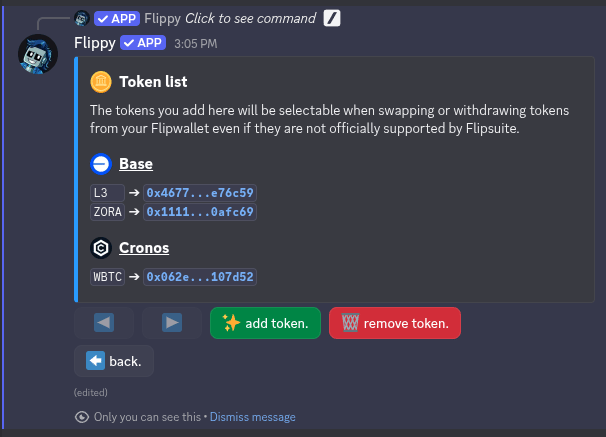
In the token list settings, you can save tokens that are not yet supported by Flipsuite. Adding a token to your custom token
list will have the following effects:
* Token will show up in your Flipwallet balance
* Token will show up in the selection menu when using the [/send](/flippy/commands/send) command.
* Token will show up in the selection menu when using any of the trading commands.
### 7. Token list
In the token list settings, you can save tokens that are not yet supported by Flipsuite. Adding a token to your custom token
list will have the following effects:
* Token will show up in your Flipwallet balance
* Token will show up in the selection menu when using the [/send](/flippy/commands/send) command.
* Token will show up in the selection menu when using any of the trading commands.
 Tokens you add to your custom token list cannot be tipped to others. Only tokens that are officially
supported by Flipsuite can be tipped to others and used as rewards.
Tokens you add to your custom token list cannot be tipped to others. Only tokens that are officially
supported by Flipsuite can be tipped to others and used as rewards.