> ## Documentation Index
> Fetch the complete documentation index at: https://docs.flipsuite.xyz/llms.txt
> Use this file to discover all available pages before exploring further.

# Setup

> Invite Flippy, create gating rules, and post your verification panel.

> Setting up gating starts with Discord permissions and role hierarchy, then moves into rule creation and posting the
> verification panel.

## Step 1 - Invite Flippy

If Flippy is not in your server yet, start with the [Quickstart](/quickstart) guide and invite it.

* **Manage Roles** permission is required for granting and removing gated roles.

## Step 2 - Prepare Discord roles

Before creating rules, move Flippy's role above every role you want gating to manage.

<Warning>
  Flippy can only grant and revoke roles from users in your server that are **below its role** in your server's
  role hierarchy. You can access it by going to the `Roles` tab in your server settings.

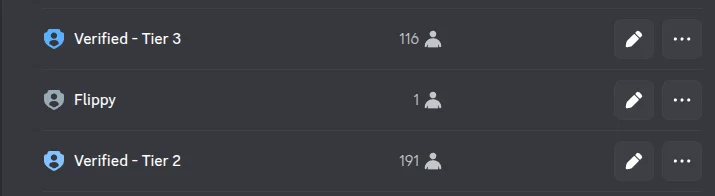
  <Frame caption={"Example server role hierarchy"}>
    <img src="https://mintcdn.com/flipsuite/bnM5dvoJ_bEaUYYE/images/rewards/role-hierarchy.png?fit=max&auto=format&n=bnM5dvoJ_bEaUYYE&q=85&s=4ab2873db4e56ab7bb70d429625ad176" className="rounded-lg" width="715" height="196" data-path="images/rewards/role-hierarchy.png" />
  </Frame>

  In the example above, Flippy can only grant the "Verified - Tier 2" role to your community members. It won't have
  access to the "Verified - Tier 3" role because it's above the bot's role.
</Warning>

## Step 3 - Create gating rules

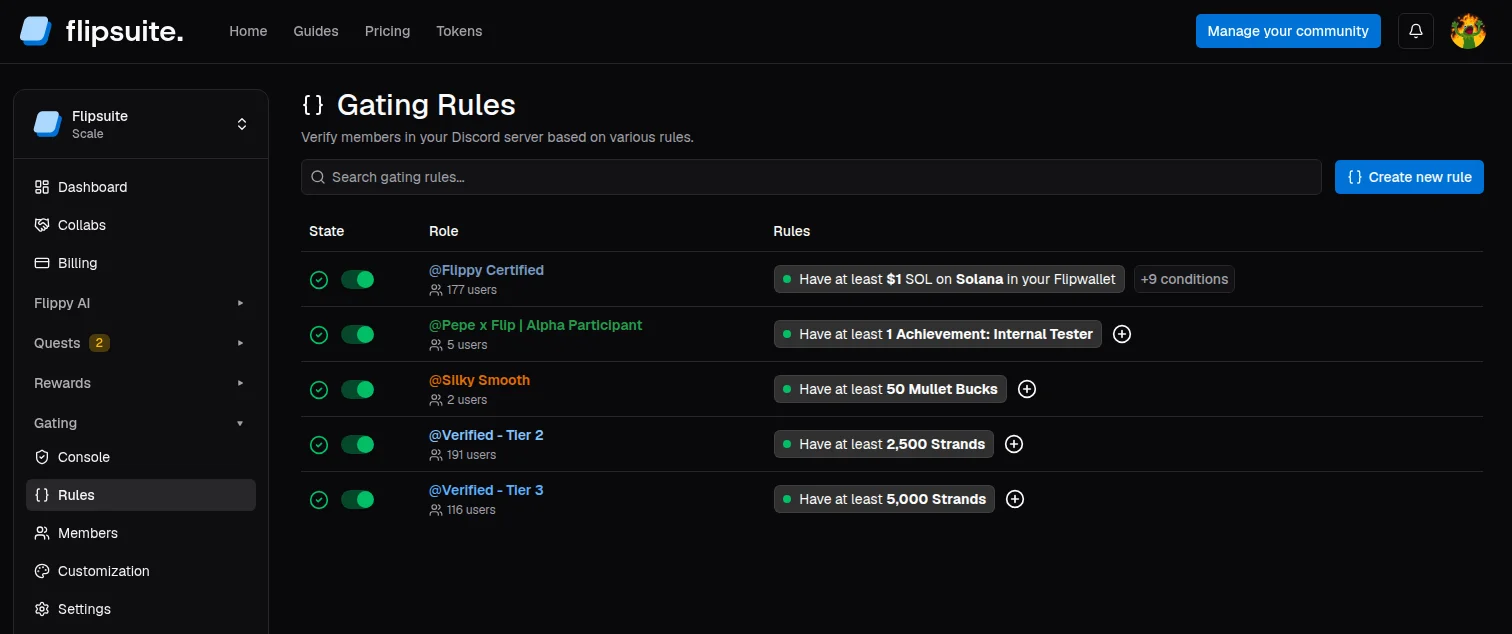
Open **Gating** in your community dashboard and go to **Rules**. Here, you can add your first rule.

<Frame caption={"Gating rules dashboard"}>
  <img src="https://mintcdn.com/flipsuite/NgsjeEOhwOTbzIyY/images/gating/gating-rules.png?fit=max&auto=format&n=NgsjeEOhwOTbzIyY&q=85&s=5eea3eebcc576e9d4a6a9cb58fedf579" className="rounded-lg" width="1512" height="634" data-path="images/gating/gating-rules.png" />
</Frame>

Each gating rule has two parts:

* **Discord role**: The role Flipsuite should grant when the rule passes.
* **Requirement**: The condition that must be satisfied by the verifying member.
<Tip>
  Gating reuses a subset of quest requirements under the hood, so the rule builder will feel familiar if you already use
  the [Quest Engine](/quests/introduction). Unlike quests, gating only supports automatically verifiable requirements.
  Input and manual-review tasks are not available here yet.
</Tip>

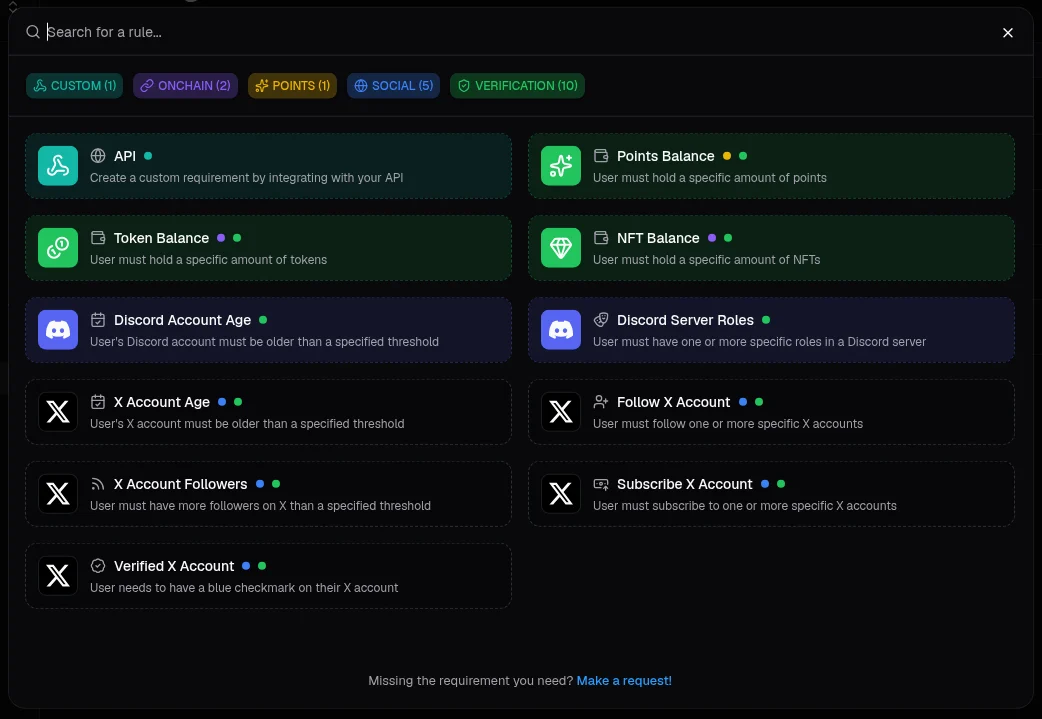
View [task library](/quests/tasks) for a full list of available requirement types.

<Frame caption={"Available gating requirements"}>
  <img src="https://mintcdn.com/flipsuite/NgsjeEOhwOTbzIyY/images/gating/gating-requirements.png?fit=max&auto=format&n=NgsjeEOhwOTbzIyY&q=85&s=a6f7d46bdd1a82edf34a8b4d63fb4627" className="rounded-lg" width="1042" height="719" data-path="images/gating/gating-requirements.png" />
</Frame>

## Step 4 - Post the verification panel

Once you have at least one rule, open **Gating > Console** and choose a **gating panel channel**. Flipsuite will
post the verification panel automatically in that channel.
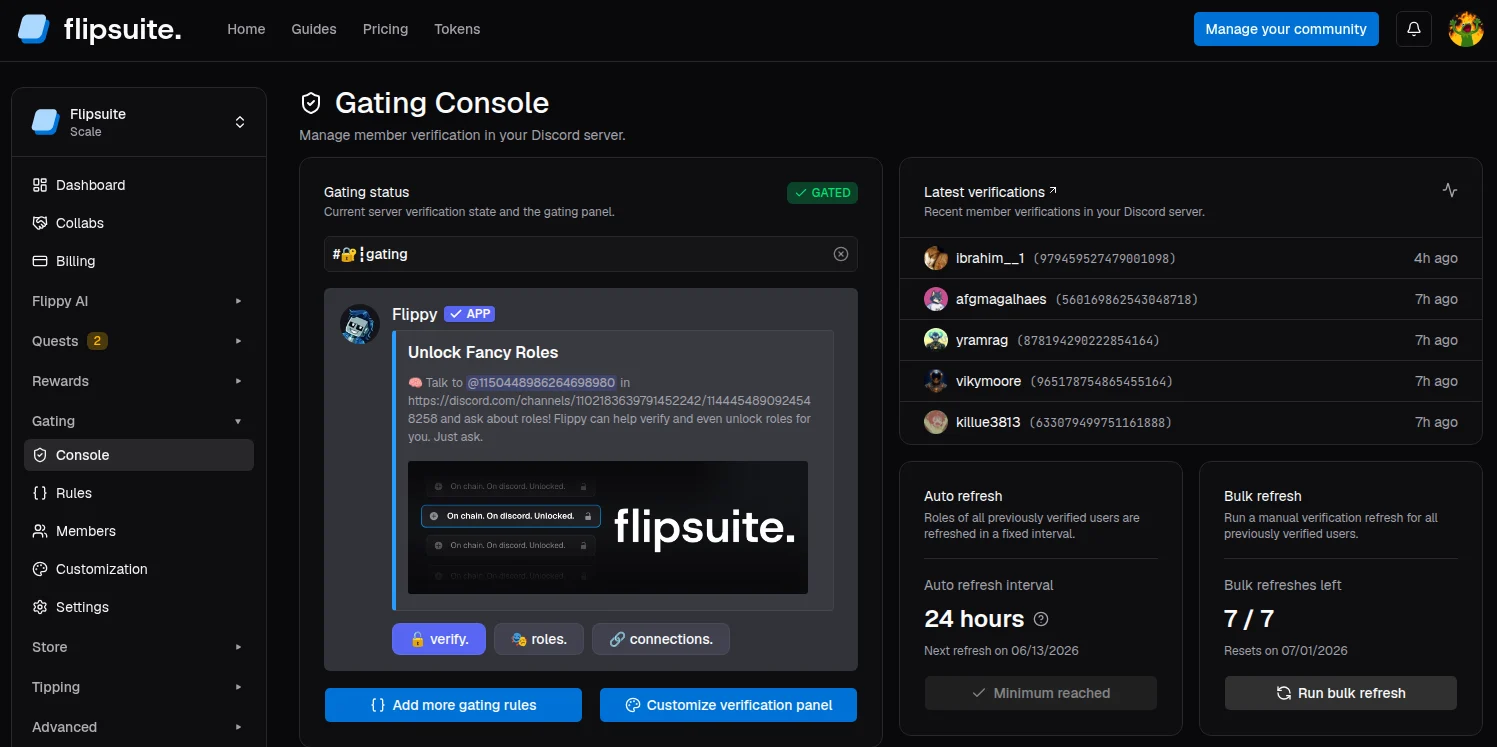
<Frame caption={"Gating console"}>
  <img src="https://mintcdn.com/flipsuite/NgsjeEOhwOTbzIyY/images/gating/gating-console.png?fit=max&auto=format&n=NgsjeEOhwOTbzIyY&q=85&s=85a2f6de3823fd1230210c6f37e60bfa" className="rounded-lg" width="1497" height="747" data-path="images/gating/gating-console.png" />
</Frame>

After the channel is set members can click **verify** to verify and unlock roles in your server.
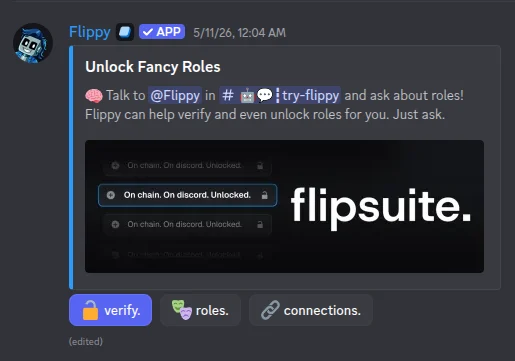
<Frame caption={"Verification panel in Discord"}>
  <img src="https://mintcdn.com/flipsuite/NgsjeEOhwOTbzIyY/images/gating/gating-panel.png?fit=max&auto=format&n=NgsjeEOhwOTbzIyY&q=85&s=9130e21300a0de62de07703653b5d8dd" className="rounded-lg" width="515" height="361" data-path="images/gating/gating-panel.png" />
</Frame>

## What's next?

Learn how to keep roles in sync, route verification logs, and customize the panel's appearance.

<CardGroup cols="2">
  <Card title="Refreshing" icon="repeat" href="/gating/refreshing">
    Learn how to manually refresh your community members' roles.
  </Card>

  <Card title="Notifications" icon="bell-ring" href="/gating/notifications">
    Get notified whenever users' roles are updated due to verification.
  </Card>

  <Card title="Customization" icon="sparkles" href="/gating/customization">
    <p className="mb-1">Customize the gating verification panel in your server.</p>

    <div className="absolute top-4 left-16">
      <a className="pricing-badge animate-shimmer w-fit px-3 py-1 *:my-auto inline-flex bg-primary rounded-lg text-white font-semibold border-none hover:opacity-95 transition-colors" href="https://flipsuite.xyz/pricing" target={"_blank"}><Icon icon={"cubes"} color={"white"} /><p className={"ml-2"}>Scale only</p></a>
    </div>
  </Card>
</CardGroup>
