> ## Documentation Index
> Fetch the complete documentation index at: https://docs.flipsuite.xyz/llms.txt
> Use this file to discover all available pages before exploring further.
# Creating raffles
> Learn how to create raffles using your Flipwallet.
## Overview
With Flipsuite, you can create raffles directly in Discord through raffle commands.
There are multiple ways to create raffles which we'll explain in detail down below.
## Commands
### `/raffle token`
This command is used to create token raffles with one of the [supported tokens](https://flipsuite.xyz/tokens).
One of the [supported tokens](https://flipsuite.xyz/tokens) you want to raffle.
Amount to raffle. You can use "%" and "\$" for relative amounts. **It's shared between all winners**.
Countdown duration in minutes before the raffle ends.
Note that will be displayed in the raffle message.
Whether you want to create the raffle anonymously or not.
A total number of people who can enter the raffle.
Number of people who can win the raffle.
Users and/or roles allowed to enter the raffle. Start typing "@" and select one or more users/roles.
Users and/or roles forbidden from entering the raffle. Start typing "@" and select one or more users/roles.
Number of consecutive raffles to create.
Delay (in minutes) between consecutive raffles.
### `/raffle nft`
This command is used to create NFT raffles with one of the NFTs from your `/inventory`.
One of the [supported chains](https://flipsuite.xyz/tokens).
NFT to raffle.
Number of NFTs to raffle (applicable only to ERC-1155 tokens).
Countdown duration in minutes before the raffle ends.
Note that will be displayed in the raffle message.
Whether you want to create the raffle anonymously or not.
A total number of people who can enter the raffle.
Users and/or roles allowed to enter the raffle. Start typing "@" and select one or more users/roles.
Users and/or roles forbidden from entering the raffle. Start typing "@" and select one or more users/roles.
### `/raffle role`
This command is used to create Discord role raffles.
Discord role to raffle.
Duration of the role to raffle. If omitted, the role will be granted forever.
Countdown duration in minutes before the raffle ends.
Note that will be displayed in the raffle message.
Whether you want to create the raffle anonymously or not.
A total number of people who can enter the raffle.
Number of people who can win the raffle.
Users and/or roles allowed to enter the raffle. Start typing "@" and select one or more users/roles.
Users and/or roles forbidden from entering the raffle. Start typing "@" and select one or more users/roles.
Number of consecutive raffles to create.
Delay (in minutes) between consecutive raffles.
Flippy can only grant and revoke roles from users in your server that are **below its role** in your server's
role hierarchy. You can access it by going to the `Roles` tab in your server settings.
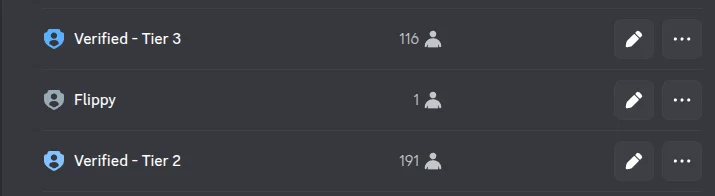 In the example above, Flippy can only grant the "Verified - Tier 2" role to your community members. It won't have
access to the "Verified - Tier 3" role because it's above the bot's role.
### `/raffle custom`
This command is used to create raffles for custom items.
Prize description.
Countdown duration in minutes before the raffle ends.
Note that will be displayed in the raffle message.
Whether you want to create the raffle anonymously or not.
A total number of people who can enter the raffle.
Number of people who can win the raffle.
Users and/or roles allowed to enter the raffle. Start typing "@" and select one or more users/roles.
Users and/or roles forbidden from entering the raffle. Start typing "@" and select one or more users/roles.
Number of consecutive raffles to create.
Delay (in minutes) between consecutive raffles.
## Examples
### Create token raffle
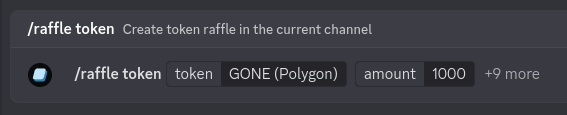
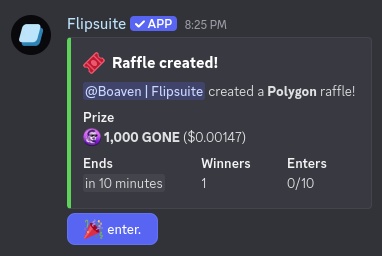
To create a token raffle that can be entered by everyone, simply choose a token and its amount.
In the example above, Flippy can only grant the "Verified - Tier 2" role to your community members. It won't have
access to the "Verified - Tier 3" role because it's above the bot's role.
### `/raffle custom`
This command is used to create raffles for custom items.
Prize description.
Countdown duration in minutes before the raffle ends.
Note that will be displayed in the raffle message.
Whether you want to create the raffle anonymously or not.
A total number of people who can enter the raffle.
Number of people who can win the raffle.
Users and/or roles allowed to enter the raffle. Start typing "@" and select one or more users/roles.
Users and/or roles forbidden from entering the raffle. Start typing "@" and select one or more users/roles.
Number of consecutive raffles to create.
Delay (in minutes) between consecutive raffles.
## Examples
### Create token raffle
To create a token raffle that can be entered by everyone, simply choose a token and its amount.
 **Result:**
 ### Create NFT raffle
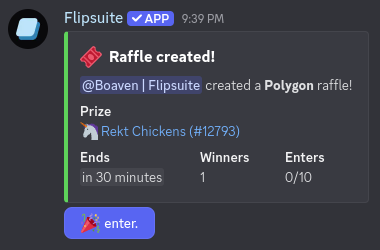
To create an NFT raffle that can be entered by everyone, simply choose a token and its amount.
### Create NFT raffle
To create an NFT raffle that can be entered by everyone, simply choose a token and its amount.
 **Result:**
 ### Create role raffle
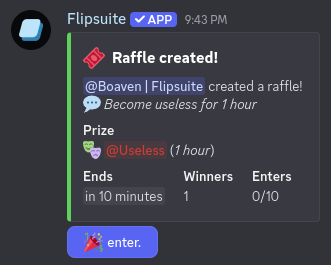
To create a Discord role raffle that can be entered by everyone, simply choose a token and its amount.
### Create role raffle
To create a Discord role raffle that can be entered by everyone, simply choose a token and its amount.
 **Result:**
 ### Create custom raffle
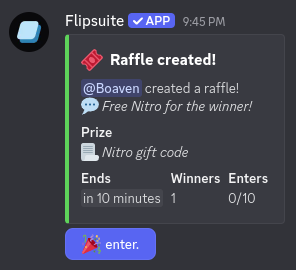
To create a custom item raffle that can be entered by everyone, simply choose a token and its amount.
### Create custom raffle
To create a custom item raffle that can be entered by everyone, simply choose a token and its amount.
 **Result:**
 ### Create raffle for specific users
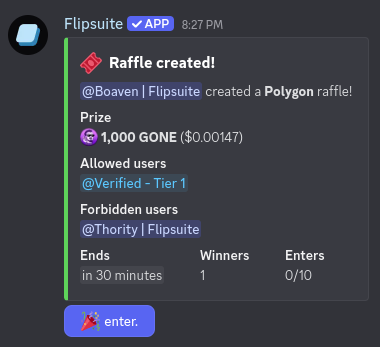
To create a raffle that can only be entered by specific users, mention users and/or roles that are allowed to enter
in the `allowed-users` command argument. If you want to restrict some users and/or roles from entering the raffle,
mention them in the `forbidden-users` command argument instead.
### Create raffle for specific users
To create a raffle that can only be entered by specific users, mention users and/or roles that are allowed to enter
in the `allowed-users` command argument. If you want to restrict some users and/or roles from entering the raffle,
mention them in the `forbidden-users` command argument instead.
 **Result:**
 ### Create repeating raffle
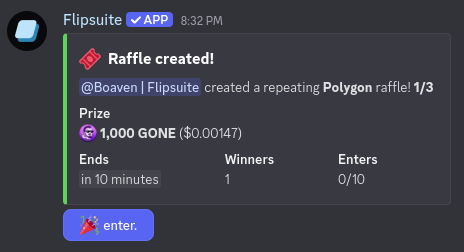
To create a repeating raffle, simply fill in the `count` and `delay` command fields. Raffles created this way will
repeat one after another with the delay set by the `delay` field.
For example, to schedule a raffle that is created 5 minutes after the previous one ends for 3 consecutive times,
you would enter `count:3` and `delay:5`, as shown in the screenshot below.
### Create repeating raffle
To create a repeating raffle, simply fill in the `count` and `delay` command fields. Raffles created this way will
repeat one after another with the delay set by the `delay` field.
For example, to schedule a raffle that is created 5 minutes after the previous one ends for 3 consecutive times,
you would enter `count:3` and `delay:5`, as shown in the screenshot below.
 **Result:**
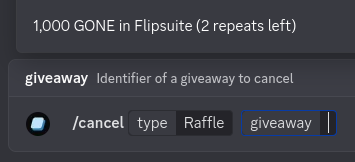
 To cancel a repeating raffle, just execute the `/cancel type:Raffle` command and select a repeating raffle to cancel.
 ## Settings
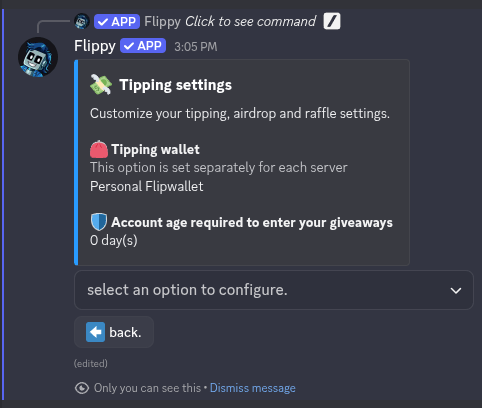
You can modify the following account-wide tipping settings in your [/profile](/flippy/commands/profile):
* The minimum account age that's required to enter your airdrops and raffles.
## Settings
You can modify the following account-wide tipping settings in your [/profile](/flippy/commands/profile):
* The minimum account age that's required to enter your airdrops and raffles.
 ## Permissions
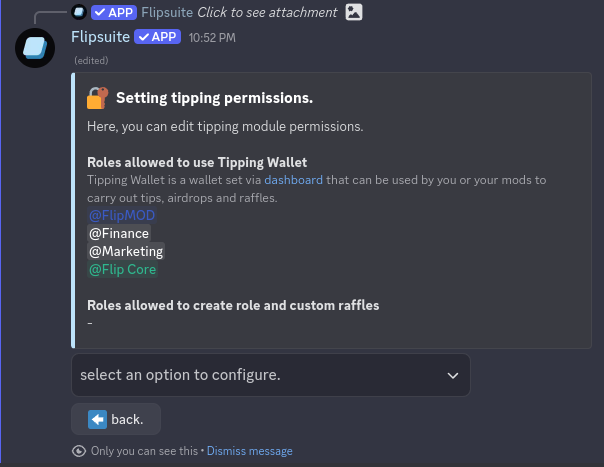
By default, only admins can create role and custom raffles in your server. If you wish to also allow your server
mods to create them, you can do so via [control panel](/quickstart#step-2-setup-your-control-panel) in Discord.
Simply go to `⚙️ settings > 💸 tipping > 🔐 permissions` until you are here:
## Permissions
By default, only admins can create role and custom raffles in your server. If you wish to also allow your server
mods to create them, you can do so via [control panel](/quickstart#step-2-setup-your-control-panel) in Discord.
Simply go to `⚙️ settings > 💸 tipping > 🔐 permissions` until you are here: