> ## Documentation Index
> Fetch the complete documentation index at: https://docs.flipsuite.xyz/llms.txt
> Use this file to discover all available pages before exploring further.
# Sending tips
> Learn how to send tips using your Flipwallet.
## Overview
With Flipsuite, you can send both token and NFT tips directly in Discord through tipping commands.
There are multiple ways to send tips which we'll explain in detail down below.
## Commands
### `/tip token`
This command is used to send tips with one of the [supported tokens](https://flipsuite.xyz/tokens) to a single person,
multiple people, roles, or active members.
Users and/or roles to tip. Start typing "@" and select one or more users/roles, or type "active" if you want to tip
active members.
One of the [supported tokens](https://flipsuite.xyz/tokens) you want to tip.
Amount to tip. You can use "%" and "\$" for relative amounts.
Note that will be displayed in the tip notification.
Whether you want to send the tip anonymously or not.
Number of consecutive tips to create.
Delay (in minutes) between consecutive tips.
### `/tip nft`
This command is used to send NFT from your `/inventory` to a single person.
User to tip.
One of the [supported chains](https://flipsuite.xyz/tokens).
NFT to tip.
Number of NFTs to tip (applicable only to ERC-1155 tokens).
Note that will be displayed in the tip notification.
Whether you want to send the tip anonymously or not.
## Examples
### Send token tip
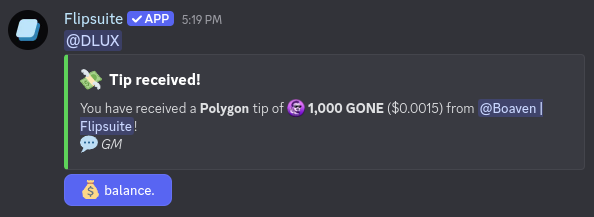
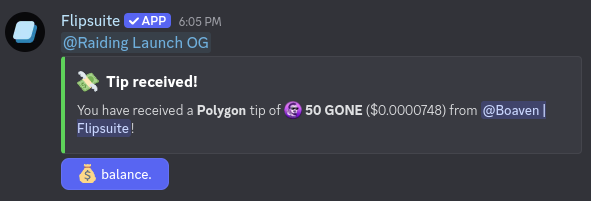
To send a tip to a single person, simply mention them in the `recipients` command field and fill in the
other command arguments.
 **Result:**
 ### Send NFT tip
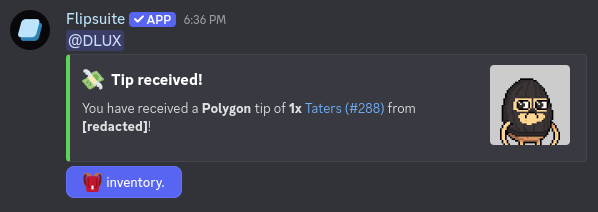
To send an NFT tip to a single person, simply mention them in the `recipient` command field and fill in the
other command arguments. NFTs you tip must be present in your `/inventory`.
### Send NFT tip
To send an NFT tip to a single person, simply mention them in the `recipient` command field and fill in the
other command arguments. NFTs you tip must be present in your `/inventory`.
 **Result:**
 **Result:**
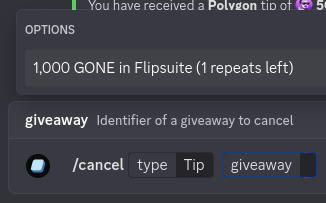
 To cancel a repeating tip, just execute the `/cancel type:Tip` command and select a repeating tip to cancel.
 ### Send token tips to multiple people
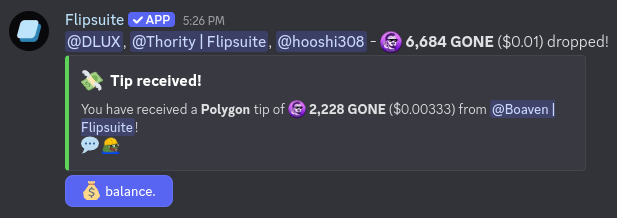
To send tips to multiple people simultaneously, mention them in the `recipients` command field and fill in the
other command arguments.
The amount you type in the `amount` command field will be split evenly between the recipients.
### Send token tips to multiple people
To send tips to multiple people simultaneously, mention them in the `recipients` command field and fill in the
other command arguments.
The amount you type in the `amount` command field will be split evenly between the recipients.
 **Result:**
 ### Send token tips to roles
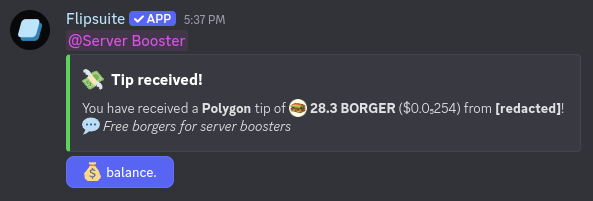
To send tips to specific role, mention them in the `recipients` command field and fill in the
other command arguments.
The amount you type in the `amount` command field will be split evenly between the recipients.
There's a hard limit on how many people you can tip at once.
If the roles you select result in more than 500 recipients, you will be asked to choose a less common role to tip.
### Send token tips to roles
To send tips to specific role, mention them in the `recipients` command field and fill in the
other command arguments.
The amount you type in the `amount` command field will be split evenly between the recipients.
There's a hard limit on how many people you can tip at once.
If the roles you select result in more than 500 recipients, you will be asked to choose a less common role to tip.
 **Result:**
 ### Send token tips to active members
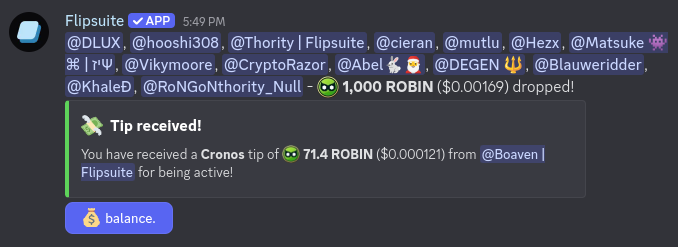
To send tips to active members, simply type **active** in the `recipients` command field and fill in the
other command arguments.
By default, Flipsuite checks who was active by looking at the messages sent in the last hour in the channel where the command
is used. If you want to change this time frame, simply add the desired duration at the end of the `recipients` field.
For example, to tip all active members in the last 6 hours, you would type "active 6 hours".
The amount you type in the `amount` command field will be split evenly between the recipients.
### Send token tips to active members
To send tips to active members, simply type **active** in the `recipients` command field and fill in the
other command arguments.
By default, Flipsuite checks who was active by looking at the messages sent in the last hour in the channel where the command
is used. If you want to change this time frame, simply add the desired duration at the end of the `recipients` field.
For example, to tip all active members in the last 6 hours, you would type "active 6 hours".
The amount you type in the `amount` command field will be split evenly between the recipients.
 **Result:**
 ### Send repeating token tips
To send repeated tips, simply fill in the `count` and `delay` command fields. Tips sent this way will repeat in the
interval set by the `delay` field.
For example, to schedule a tip to be sent every 5 minutes for 3 consecutive times, you would enter `count:3`
and `delay:5`, as shown in the screenshot below.
### Send repeating token tips
To send repeated tips, simply fill in the `count` and `delay` command fields. Tips sent this way will repeat in the
interval set by the `delay` field.
For example, to schedule a tip to be sent every 5 minutes for 3 consecutive times, you would enter `count:3`
and `delay:5`, as shown in the screenshot below.
