> ## Documentation Index
> Fetch the complete documentation index at: https://docs.flipsuite.xyz/llms.txt
> Use this file to discover all available pages before exploring further.

# Positions

> Learn more about the /perp positions command.

## Overview

You can use `/perp positions` command to view your open and closed positions.
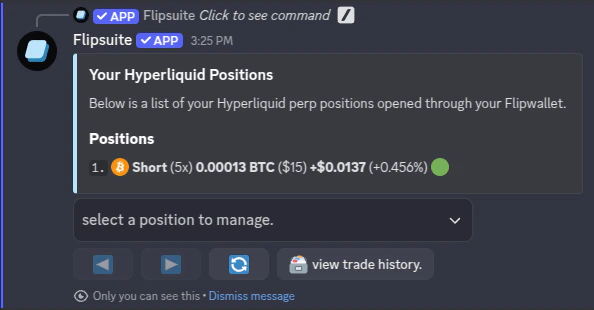
<Frame caption={"Open positions"}>
  <img src="https://mintcdn.com/flipsuite/3NPkqtLtEVXfOW7V/images/modules/trading/open-positions.png?fit=max&auto=format&n=3NPkqtLtEVXfOW7V&q=85&s=ec48c80f71ce7d8438a6f11b5b2f46ea" className="rounded-lg" width="594" height="310" data-path="images/modules/trading/open-positions.png" />
</Frame>

To view your perpetual trading history, simply tap the **view trade history** button:
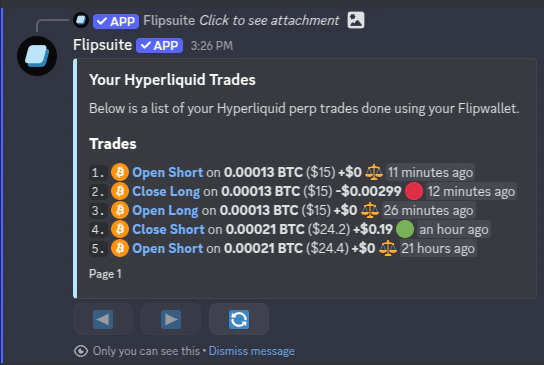
<Frame caption={"Trade history"}>
  <img src="https://mintcdn.com/flipsuite/3NPkqtLtEVXfOW7V/images/modules/trading/archived-positions.png?fit=max&auto=format&n=3NPkqtLtEVXfOW7V&q=85&s=5e0d61278a1a4151693e333316b36d17" className="rounded-lg" width="544" height="365" data-path="images/modules/trading/archived-positions.png" />
</Frame>
