> ## Documentation Index
> Fetch the complete documentation index at: https://docs.flipsuite.xyz/llms.txt
> Use this file to discover all available pages before exploring further.
# Sell
> Learn more about the /limit sell command.
## Overview
You can use `/limit sell` command to place limit sell orders on certain tokens.
Name or address of the token to buy.
Amount to sell (use "%" or "\$" for relative amounts)
Order will execute above this price (use "%" for relative increase)
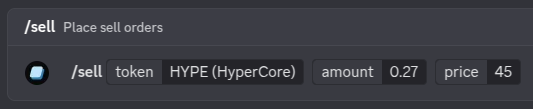 If limit orders are supported for the token you've entered, you will get a quote for your order:
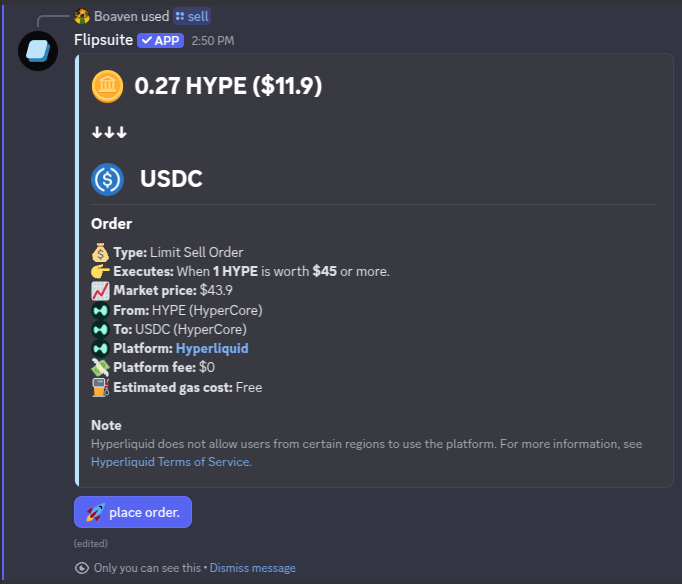 If you're satisfied with the quote, simply click the **place order** button to place the order.
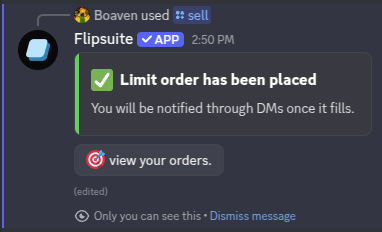 You will be notified via DMs once your order is fulfilled.
You can use the [/limit orders](/modules/trading/commands/orders) command in Discord to view all your limit orders.
You will be notified via DMs once your order is fulfilled.
You can use the [/limit orders](/modules/trading/commands/orders) command in Discord to view all your limit orders.