> ## Documentation Index
> Fetch the complete documentation index at: https://docs.flipsuite.xyz/llms.txt
> Use this file to discover all available pages before exploring further.
# Hyperliquid
> Learn how to start trading on Hyperliquid using Flipsuite.
## Overview
Flipsuite is integrated with [Hyperliquid](https://app.hyperliquid.xyz/trade) to provide more trading features across the board,
enabling perpetual and spot trading using your Flipwallet.
## What is Hyperliquid?
[Hyperliquid](https://hyperfoundation.org/) is a performant blockchain built with the vision of a fully onchain open
financial system. Liquidity, user applications, and trading activity synergize on a unified platform that will
ultimately house all of finance. Its state execution is split into two broad components:
1. **HyperEVM**
2. **HyperCore**
### HyperEVM
HyperEVM integrates the general-purpose smart contract capabilities common to Ethereum into the Hyperliquid blockchain.
HyperCore's performant liquidity and financial primitives are exposed as permissionless building blocks for all users and
developers on HyperEVM. Users can utilize the full range of Flipsuite features on HyperEVM.
### HyperCore
HyperCore includes fully onchain perpetual futures and spot order books. Every order, cancel, trade, and liquidation
happens transparently with one-block finality. HyperCore is designed primarily for trading, so a Flipsuite reward
system is not available on HyperCore.
## Trading on Hyperliquid
Trading on Hyperliquid is done on HyperCore, so you need to get your funds there first.
### How to get funds on HyperCore?
The best way to get your funds to HyperCore from other chains is to have some gas tokens available (like `ETH`, `POL`, or `SOL`)
and bridge them into HyperCore's `USDC` token by using the [/swap tokens](/modules/trading/commands/swap) command or by asking [Flippy](/flippy/introduction).
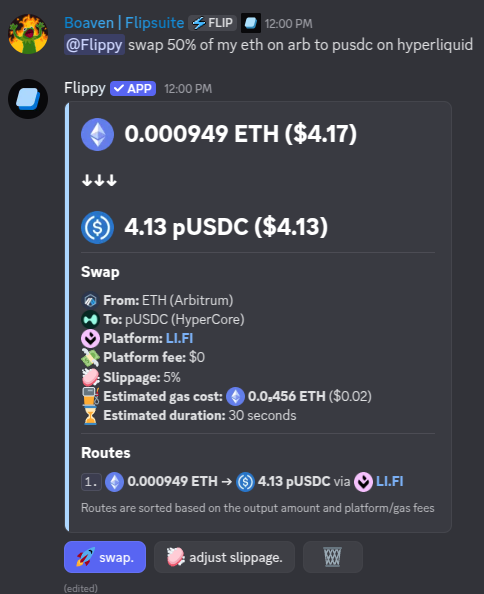 Once you have some `USDC` on HyperCore you can start trading!
Make sure to have more than 10 USDC in your Flipwallet on HyperCore, as Hyperliquid won't let you place orders
that are worth less than \$10 to prevent spam.
You can also transfer certain tokens that are deployed (and linked) on both HyperEVM and HyperCore between these
two chains. To do so simply use the [/swap tokens](/modules/trading/commands/swap) command and specify the desired token as both source
and destination token like this:
HyperCore token transfer"}>
Once you have some `USDC` on HyperCore you can start trading!
Make sure to have more than 10 USDC in your Flipwallet on HyperCore, as Hyperliquid won't let you place orders
that are worth less than \$10 to prevent spam.
You can also transfer certain tokens that are deployed (and linked) on both HyperEVM and HyperCore between these
two chains. To do so simply use the [/swap tokens](/modules/trading/commands/swap) command and specify the desired token as both source
and destination token like this:
HyperCore token transfer"}>
 ### Placing market spot orders
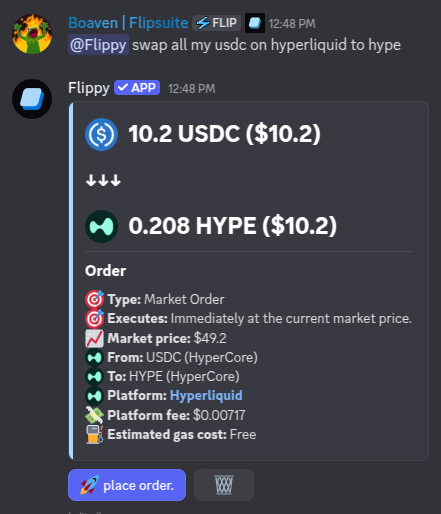
To place spot market orders using your HyperCore `USDC`, simply use the [/swap tokens](/modules/trading/commands/swap) command
in Discord, or ask Flippy to place them for you like this:
> Hey **@Flippy** swap 50 USDC to HYPE on Hyperliquid
### Placing market spot orders
To place spot market orders using your HyperCore `USDC`, simply use the [/swap tokens](/modules/trading/commands/swap) command
in Discord, or ask Flippy to place them for you like this:
> Hey **@Flippy** swap 50 USDC to HYPE on Hyperliquid
 ### Placing limit spot orders
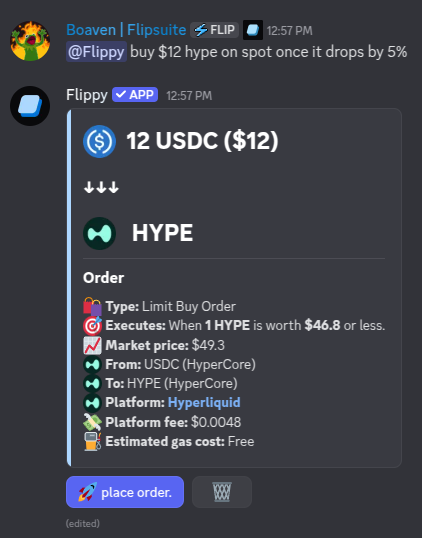
To place spot limit orders using your HyperCore `USDC`, simply use the [/limit buy](/modules/trading/commands/buy) and
[/limit sell](/modules/trading/commands/sell) commands in Discord, or ask Flippy to place them for you like this:
> Hey **@Flippy** buy me \$100 BTC once it drops below 110k
### Placing limit spot orders
To place spot limit orders using your HyperCore `USDC`, simply use the [/limit buy](/modules/trading/commands/buy) and
[/limit sell](/modules/trading/commands/sell) commands in Discord, or ask Flippy to place them for you like this:
> Hey **@Flippy** buy me \$100 BTC once it drops below 110k
 ### Opening market perp positions
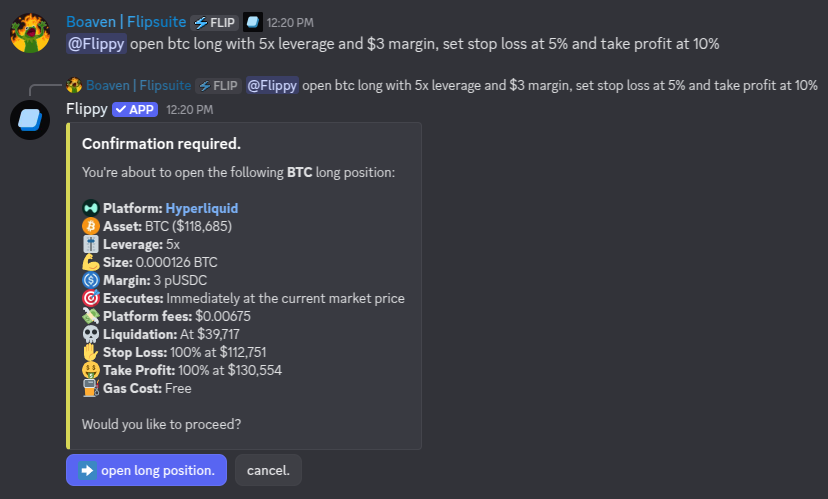
To open long and short positions using your HyperCore `USDC`, simply use the [/perp long](/modules/trading/commands/long)
and [/perp short](/modules/trading/commands/short) commands in Discord, or ask Flippy to place them for you like this:
> Hey **@Flippy** open BTC long with 15x leverage and \$20 margin, and set stop loss at 110k
### Opening market perp positions
To open long and short positions using your HyperCore `USDC`, simply use the [/perp long](/modules/trading/commands/long)
and [/perp short](/modules/trading/commands/short) commands in Discord, or ask Flippy to place them for you like this:
> Hey **@Flippy** open BTC long with 15x leverage and \$20 margin, and set stop loss at 110k
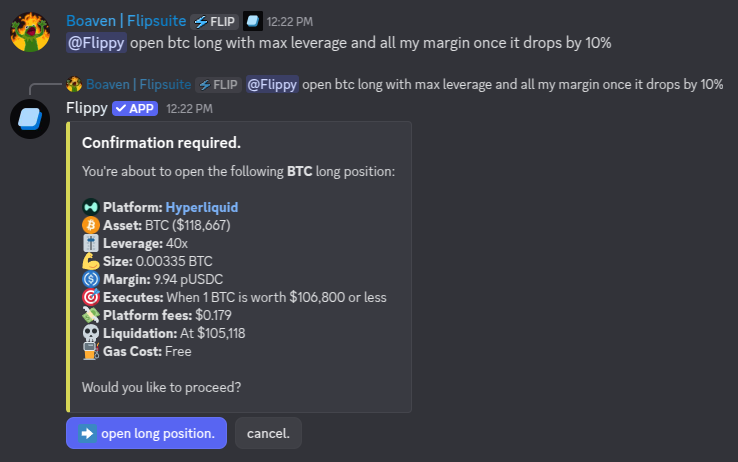
 ### Opening limit perp positions
If you prefer to open a position only once a certain price target is hit:
> Hey **@Flippy** open ETH long with max leverage and \$50 margin once it drops by 2%
### Opening limit perp positions
If you prefer to open a position only once a certain price target is hit:
> Hey **@Flippy** open ETH long with max leverage and \$50 margin once it drops by 2%
 ### Setting multiple SL and TP levels
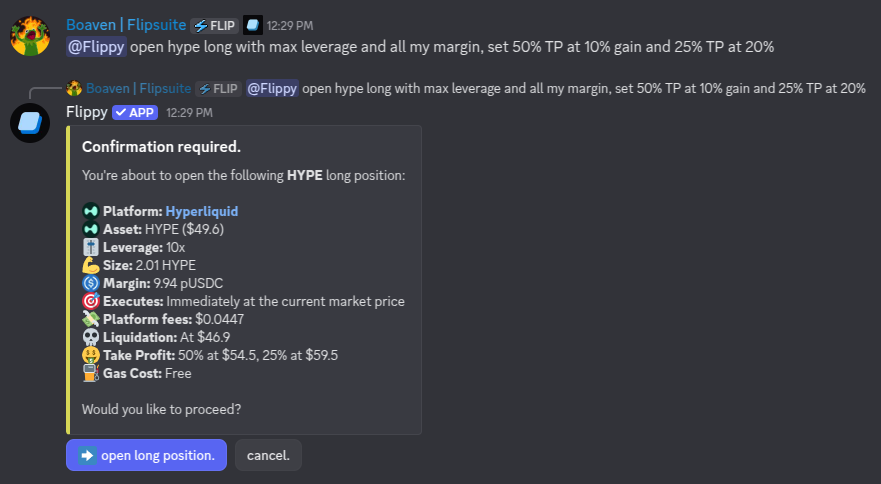
You can set multiple stop loss and take profit targets for your perp positions like this:
> Hey **@Flippy** open HYPE long with max leverage and \$50 margin, set 50% TP at 10% gain, and 25% TP at 20%
### Setting multiple SL and TP levels
You can set multiple stop loss and take profit targets for your perp positions like this:
> Hey **@Flippy** open HYPE long with max leverage and \$50 margin, set 50% TP at 10% gain, and 25% TP at 20%
 ### Sharing your perp positions
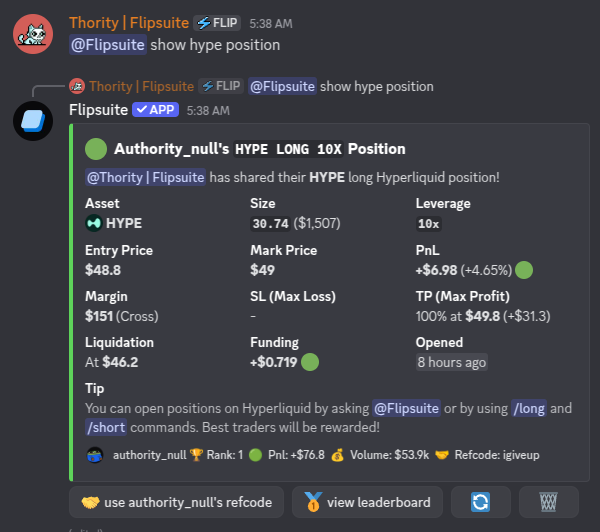
You can ask Flippy to share one of your perp positions in the chat:
### Sharing your perp positions
You can ask Flippy to share one of your perp positions in the chat:
 ### Closing your perp positions
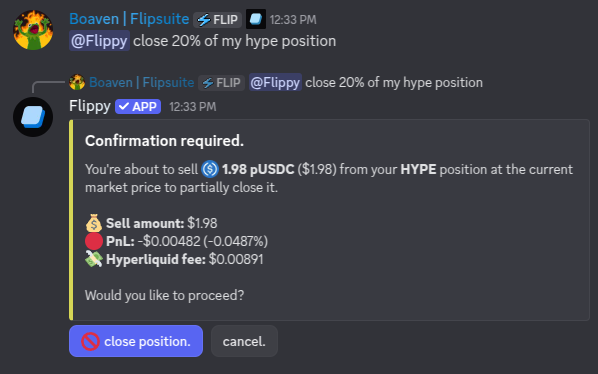
You can fully or partially close your perp positions by asking Flippy to do so:
> Hey **@Flippy** cancel X% of my HYPE position
### Closing your perp positions
You can fully or partially close your perp positions by asking Flippy to do so:
> Hey **@Flippy** cancel X% of my HYPE position
 ### Trading leaderboard
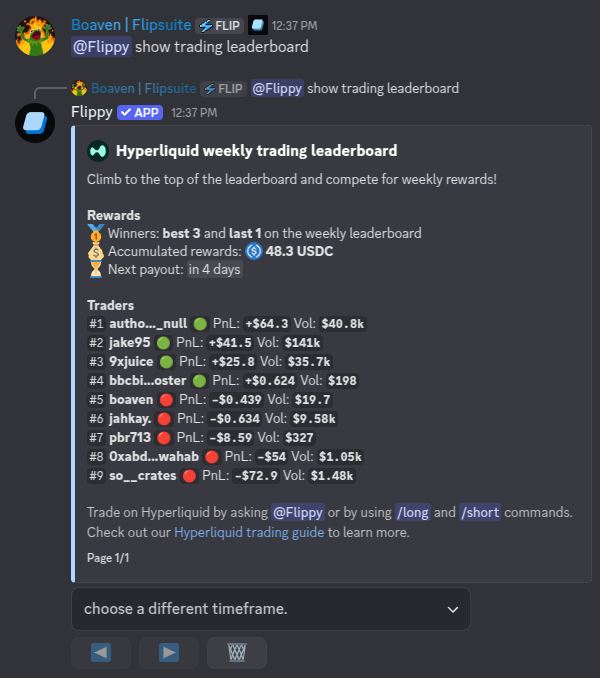
All perpetual trades you execute on Hyperliquid using your Flipwallet are tracked on the trading leaderboard. Each week,
the top 3 traders and the lowest-ranking trader (person at the bottom of the leaderboard) receive a reward proportional
to the generated trading fees in that week. You can access the trading leaderboard at any time by asking Flippy:
### Trading leaderboard
All perpetual trades you execute on Hyperliquid using your Flipwallet are tracked on the trading leaderboard. Each week,
the top 3 traders and the lowest-ranking trader (person at the bottom of the leaderboard) receive a reward proportional
to the generated trading fees in that week. You can access the trading leaderboard at any time by asking Flippy:
 ### Margin modes
When opening a perp position on Hyperliquid, you can choose between two margin modes:
1. **Isolated**
2. **Cross**
#### Isolated margin
Isolated margin restricts the collateral for a position to a single asset.
* **Risk Isolation:** Losses are limited to the margin allocated to that specific position. Liquidations in an isolated position do not affect your other trades.
* **Manual Adjustments:** You can manually add or remove margin from an open position to adjust your liquidation price (except for "strict isolated" assets).
* **PnL Handling:** Unrealized profits are applied directly to the position as additional margin.
#### Cross margin
Cross margin is designed for maximum capital efficiency.
* **Shared Collateral:** All cross positions share the same collateral pool. This allows profits from one position to support the margin requirements of another.
* **Liquidation Risk:** Since margin is shared, a significant loss in one position can potentially lead to the liquidation of all other cross positions in your account.
* **Automated PnL:** Unrealized profits are automatically available as initial margin to open new positions.
While Hyperliquid defaults to cross margin, Flippy uses isolated mode by default to protect your balance and ensure
one position's risk doesn't affect your other assets.
### Margin modes
When opening a perp position on Hyperliquid, you can choose between two margin modes:
1. **Isolated**
2. **Cross**
#### Isolated margin
Isolated margin restricts the collateral for a position to a single asset.
* **Risk Isolation:** Losses are limited to the margin allocated to that specific position. Liquidations in an isolated position do not affect your other trades.
* **Manual Adjustments:** You can manually add or remove margin from an open position to adjust your liquidation price (except for "strict isolated" assets).
* **PnL Handling:** Unrealized profits are applied directly to the position as additional margin.
#### Cross margin
Cross margin is designed for maximum capital efficiency.
* **Shared Collateral:** All cross positions share the same collateral pool. This allows profits from one position to support the margin requirements of another.
* **Liquidation Risk:** Since margin is shared, a significant loss in one position can potentially lead to the liquidation of all other cross positions in your account.
* **Automated PnL:** Unrealized profits are automatically available as initial margin to open new positions.
While Hyperliquid defaults to cross margin, Flippy uses isolated mode by default to protect your balance and ensure
one position's risk doesn't affect your other assets.