> ## Documentation Index
> Fetch the complete documentation index at: https://docs.flipsuite.xyz/llms.txt
> Use this file to discover all available pages before exploring further.
# Sharing
> Share point systems with partner communities through collabs.
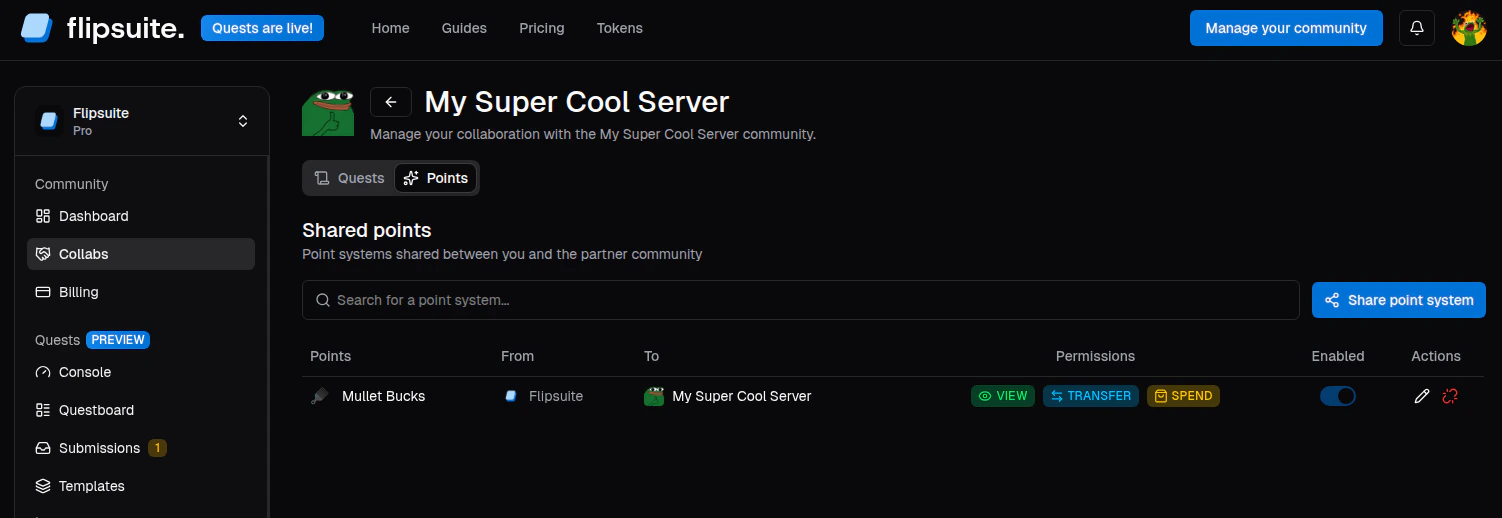 Point systems can be shared with partner communities through the **Collabs** tab. This is how you open cross-community
economy routes while still controlling what the partner can and cannot do with the shared point systems.
## Share a point system
1. Open **Collabs** and select the partner community.
2. Go to the partner's **Points** tab.
3. Click **Share point system**.
4. Select one of your active point systems.
5. Choose the permissions the partner community should receive.
6. Save to share the point system.
Point systems can be shared with partner communities through the **Collabs** tab. This is how you open cross-community
economy routes while still controlling what the partner can and cannot do with the shared point systems.
## Share a point system
1. Open **Collabs** and select the partner community.
2. Go to the partner's **Points** tab.
3. Click **Share point system**.
4. Select one of your active point systems.
5. Choose the permissions the partner community should receive.
6. Save to share the point system.
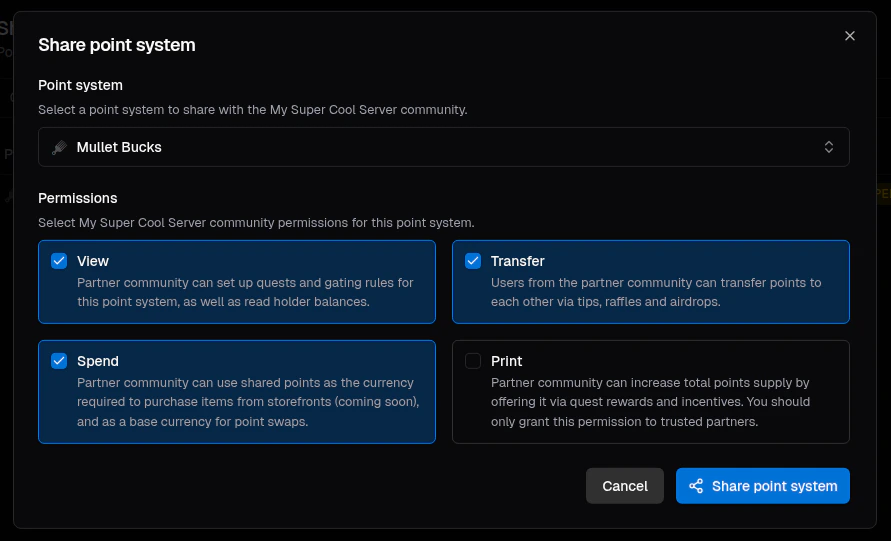 Once shared, the partner community can review the connection in the same Collabs area.
The share must be enabled on the receiving side before access becomes active.
## What each permission allows
1. **VIEW** permission lets the partner community:
* Read point system holders and their balances
* Use point-based quest tasks with the point system
* Use point-based gating rules with the point system
2. **TRANSFER** permission lets the partner community:
* Use the point system for tips, airdrops, and raffles in their server.
3. **SPEND** permission lets the partner community:
* Use the point system as the **source** point system for swaps.
* Require the point system for buying items from community storefronts.
4. **PRINT** permission lets the partner community:
* Offer the point system in quest rewards.
* Use the point system as the **target** point system for swaps.
* Print new points via tips, airdrops, and raffles (community admins only).
## Typical collaboration patterns
* Grant **VIEW** when you want the partner to build quests around your point system.
* Add **TRANSFER** when you want partner community members to use your points for tips.
* Add **SPEND** when you want the partner to support spending or swaps.
* Add **PRINT** only when you explicitly trust the partner to print more of your supply.
Only grant **PRINT** permission to trusted partners, as this permission makes it possible for the partner to print
more points, increasing the supply of the point system.
Once shared, the partner community can review the connection in the same Collabs area.
The share must be enabled on the receiving side before access becomes active.
## What each permission allows
1. **VIEW** permission lets the partner community:
* Read point system holders and their balances
* Use point-based quest tasks with the point system
* Use point-based gating rules with the point system
2. **TRANSFER** permission lets the partner community:
* Use the point system for tips, airdrops, and raffles in their server.
3. **SPEND** permission lets the partner community:
* Use the point system as the **source** point system for swaps.
* Require the point system for buying items from community storefronts.
4. **PRINT** permission lets the partner community:
* Offer the point system in quest rewards.
* Use the point system as the **target** point system for swaps.
* Print new points via tips, airdrops, and raffles (community admins only).
## Typical collaboration patterns
* Grant **VIEW** when you want the partner to build quests around your point system.
* Add **TRANSFER** when you want partner community members to use your points for tips.
* Add **SPEND** when you want the partner to support spending or swaps.
* Add **PRINT** only when you explicitly trust the partner to print more of your supply.
Only grant **PRINT** permission to trusted partners, as this permission makes it possible for the partner to print
more points, increasing the supply of the point system.