> ## Documentation Index
> Fetch the complete documentation index at: https://docs.flipsuite.xyz/llms.txt
> Use this file to discover all available pages before exploring further.
# Submissions
> Review quest submissions from community members.
## Overview
There are some task types like **File Upload** or **Create X Post** that require a manual review from your team before
they can be marked as complete. Moreover, you can enable manual review on some of the other task types as well.
When a quest includes a task requiring manual review, a submission is created for each user attempting to complete that quest.
The user's completion is marked as successful only after you approve their submission.
## Submissions
You can view each quest submission individually in the **Submissions** tab.
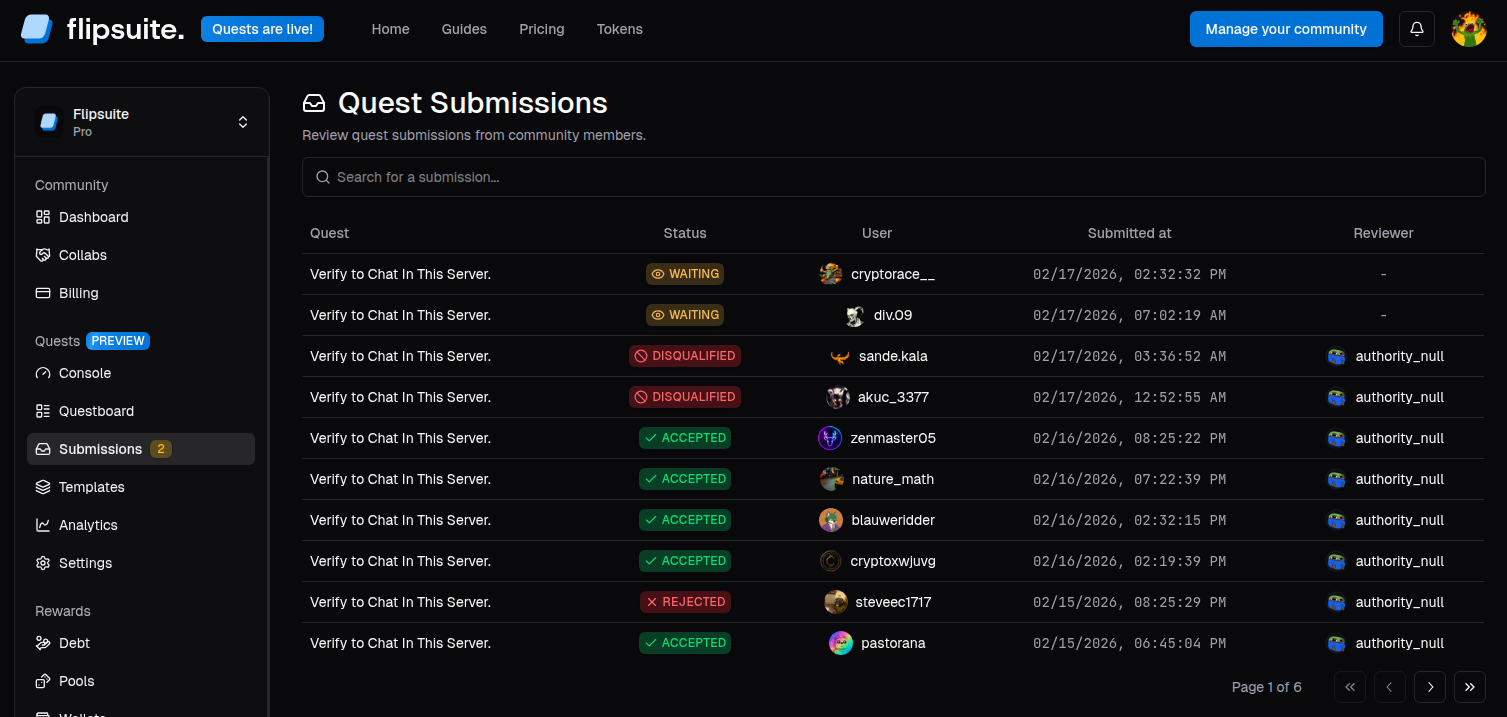 Simply click on a submission to view its details about the submitted tasks, related quest, and the user who made the submission.
After reviewing the submission, you can:
1. **Approve** - Mark the quest as complete for the user.
2. **Reject** - Reject the submission with an optional reason.
3. **Disqualify** - Reject it and prevent the user from attempting the quest again.
The user will be notified about the submission review outcome via Discord.
Simply click on a submission to view its details about the submitted tasks, related quest, and the user who made the submission.
After reviewing the submission, you can:
1. **Approve** - Mark the quest as complete for the user.
2. **Reject** - Reject the submission with an optional reason.
3. **Disqualify** - Reject it and prevent the user from attempting the quest again.
The user will be notified about the submission review outcome via Discord.