> ## Documentation Index
> Fetch the complete documentation index at: https://docs.flipsuite.xyz/llms.txt
> Use this file to discover all available pages before exploring further.
# Introduction
> Get familiar with Flipsuite's reward system.
## Rewards
Flipsuite's reward system is a key component for building strong server economies and driving thoughtful engagement
in your community! Here are the different types of rewards you can utilize to reward your community members:
Reward your community members with any of the supported tokens or NFTs of your choice, fully on-chain.
Reward your community members with spendable off-chain currency or experience.
Seamlessly integrate with nearly every Flipsuite module by rewarding your community members with Discord roles.
Get creative and reward your community with custom items like gift codes, merch, or anything else you can think of.
## How are rewards distributed?
Learn how every reward type is distributed to community members and what setup (if any) is required from you.
### Tokens and NFTs
Token and NFT rewards require you to set up a [rewards wallet](/rewards/reward-wallets) in your community dashboard that is used to
automatically send on-chain rewards to your community members.
Only tokens present on the [supported tokens](https://flipsuite.xyz/tokens) list can be rewarded through Flipsuite.
### Discord Roles
Discord roles don't require any extra setup, except making sure that Flipsuite's role is higher in your server's role
hierarchy than the role you want to grant.
Flippy can only grant and revoke roles from users in your server that are **below its role** in your server's
role hierarchy. You can access it by going to the `Roles` tab in your server settings.
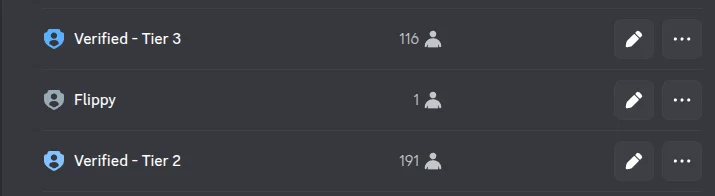 In the example above, Flippy can only grant the "Verified - Tier 2" role to your community members. It won't have
access to the "Verified - Tier 3" role because it's above the bot's role.
### Custom Rewards
Custom rewards aren't distributed automatically at all, so they don't require any extra setup. You are the one
responsible for manually granting winners their prizes.
### Points
Points are distributed automatically to community members. No extra setup is required.
## Where do I setup the rewards?
For the most part, rewards are created and managed through reward pools that allow you to distribute prizes with
different win chances and limited quantities, for maximum gamification. This makes it more exciting and fun when
members win rewards that are more rare than others.
Learn how to create reward pools in your community.
In the example above, Flippy can only grant the "Verified - Tier 2" role to your community members. It won't have
access to the "Verified - Tier 3" role because it's above the bot's role.
### Custom Rewards
Custom rewards aren't distributed automatically at all, so they don't require any extra setup. You are the one
responsible for manually granting winners their prizes.
### Points
Points are distributed automatically to community members. No extra setup is required.
## Where do I setup the rewards?
For the most part, rewards are created and managed through reward pools that allow you to distribute prizes with
different win chances and limited quantities, for maximum gamification. This makes it more exciting and fun when
members win rewards that are more rare than others.
Learn how to create reward pools in your community.