> ## Documentation Index
> Fetch the complete documentation index at: https://docs.flipsuite.xyz/llms.txt
> Use this file to discover all available pages before exploring further.
# Notifications
> Send storefront purchase notifications to Discord.
## Set up a notification channel
Open **Storefronts Settings** in your community dashboard and switch to the **Notifications** tab.
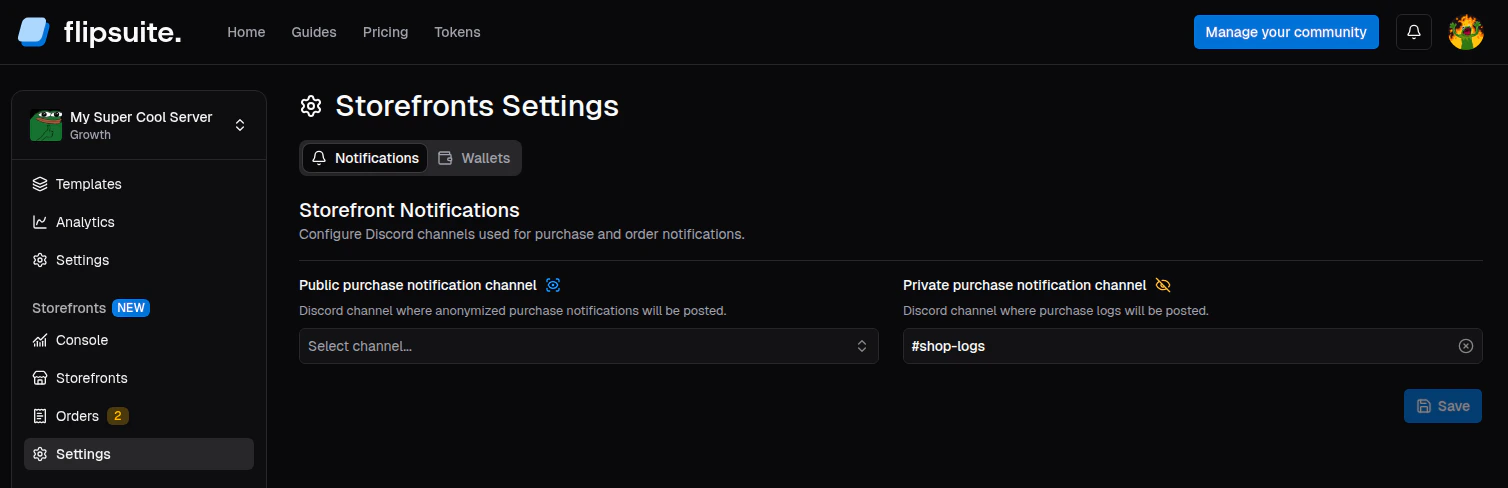 There you can configure two Discord purchase notification channels:
* **Public channel** - a channel where anonymized purchase notifications will be posted.
* **Private channel** - a channel where detailed storefront purchase logs will be posted.
## What gets posted
A private storefront purchase notification includes:
* Storefront and item details
* Buyer and recipient details
* The price and deliverables attached to the order
* Whether any deliverable still needs manual action
There you can configure two Discord purchase notification channels:
* **Public channel** - a channel where anonymized purchase notifications will be posted.
* **Private channel** - a channel where detailed storefront purchase logs will be posted.
## What gets posted
A private storefront purchase notification includes:
* Storefront and item details
* Buyer and recipient details
* The price and deliverables attached to the order
* Whether any deliverable still needs manual action
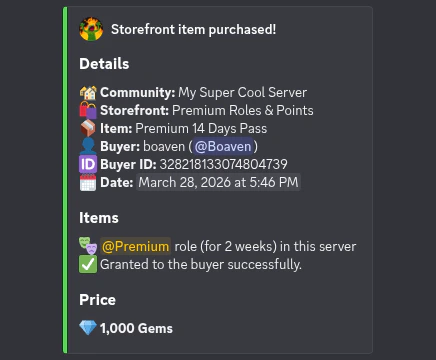 A public storefront purchase notification **does not** include buyer and recipient details.