Flipsuite home page
Search...
⌘K
Support
Dashboard
Dashboard
Search...
Navigation
Commands
Buy
Documentation
API Reference
Dashboard
Discord
X (formerly Twitter)
Getting Started
Introduction
Quickstart
Chains
Quest Engine
Introduction
Setup
Tasks
Flipwallet
Introduction
Commands
Security
Flippy
Introduction
Modules
Battleground
Gating
Gen AI
Raiding
Shop
Tipping
Tracking
Trading
Introduction
Setup
Commands
/buy
/long
/orders
/positions
/sell
/short
/swap
Guides
Whitelist
Reward System
Introduction
Reward Pools
Reward Wallets
Deferred Rewards
Account
Connections
Credits
Security
Teams
Pricing
Projects
Tokens
Legal
Terms of Service
Privacy Policy
On this page
Overview
Commands
Buy
Copy page
Learn more about the /buy command.
Copy page
Overview
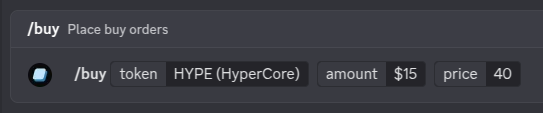
You can use
/buy
command to place limit buy orders on certain tokens.
Command arguments
token
string
required
Name or address of the token to buy.
amount
string
required
Amount to buy (use ”$” for relative amount)
price
string
required
Order will execute below this price (use ”%” for relative decrease)
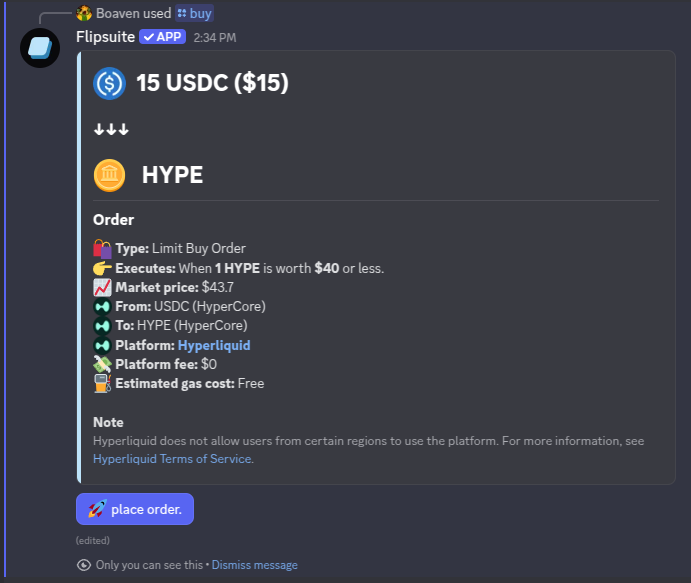
If limit orders are supported for the token you’ve entered, you will get a quote for your order:
If you’re satisfied with the quote, simply click the
place order
button to place the order.
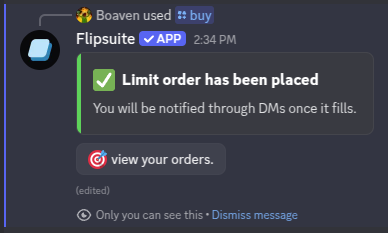
You will be notified via DMs once your order is fulfilled.
You can use the
/orders
command in Discord to view all your limit orders.
Setup
/long
⌘I