

Overview
Flipsuite is integrated with Hyperliquid to provide more trading features across the board, enabling perpetual and spot trading using your Flipwallet.What is Hyperliquid?
Hyperliquid is a performant blockchain built with the vision of a fully onchain open financial system. Liquidity, user applications, and trading activity synergize on a unified platform that will ultimately house all of finance. Its state execution is split into two broad components:- HyperEVM
- HyperCore
HyperEVM
HyperEVM integrates the general-purpose smart contract capabilities common to Ethereum into the Hyperliquid blockchain. HyperCore’s performant liquidity and financial primitives are exposed as permissionless building blocks for all users and developers on HyperEVM. Users can utilize the full range of Flipsuite features on HyperEVM.HyperCore
HyperCore includes fully onchain perpetual futures and spot order books. Every order, cancel, trade, and liquidation happens transparently with one-block finality. HyperCore is designed primarily for trading, so a Flipsuite reward system is not available on HyperCore.Trading on Hyperliquid
Trading on Hyperliquid is done on HyperCore, so you need to get your funds there first.How to get funds on HyperCore?
The best way to get your funds to HyperCore from other chains is to have some gas tokens available (likeETH, POL, or SOL)
and bridge them into HyperCore’s USDC token by using the /swap tokens command or by asking Flippy.
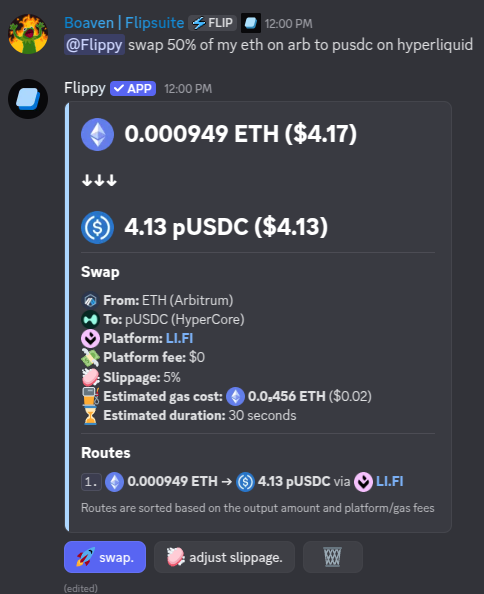
Example swap from Arbitrum to HyperCore
USDC on HyperCore you can start trading!
You can also transfer certain tokens that are deployed (and linked) on both HyperEVM and HyperCore between these
two chains. To do so simply use the /swap tokens command and specify the desired token as both source
and destination token like this:

Placing market spot orders
To place spot market orders using your HyperCoreUSDC, simply use the /swap tokens command
in Discord, or ask Flippy to place them for you like this:
Hey @Flippy swap 50 USDC to HYPE on Hyperliquid
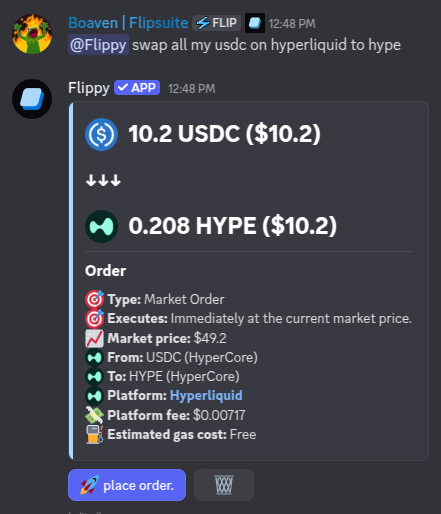
Placing a spot market order on Hyperliquid
Placing limit spot orders
To place spot limit orders using your HyperCoreUSDC, simply use the /limit buy and
/limit sell commands in Discord, or ask Flippy to place them for you like this:
Hey @Flippy buy me $100 BTC once it drops below 110k
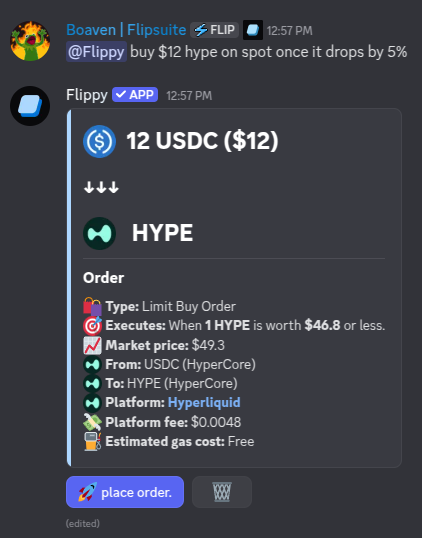
Placing a spot limit order on Hyperliquid
Opening market perp positions
To open long and short positions using your HyperCoreUSDC, simply use the /perp long
and /perp short commands in Discord, or ask Flippy to place them for you like this:
Hey @Flippy open BTC long with 15x leverage and $20 margin, and set stop loss at 110k
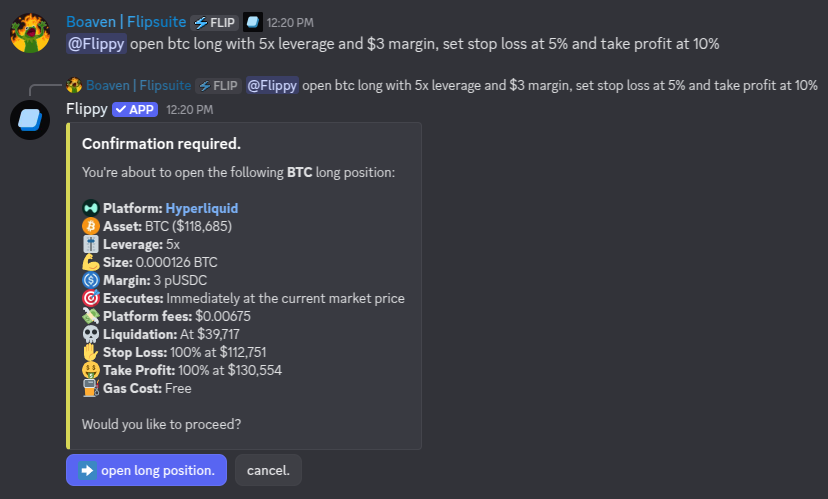
Opening a perp position on Hyperliquid
Opening limit perp positions
If you prefer to open a position only once a certain price target is hit:Hey @Flippy open ETH long with max leverage and $50 margin once it drops by 2%
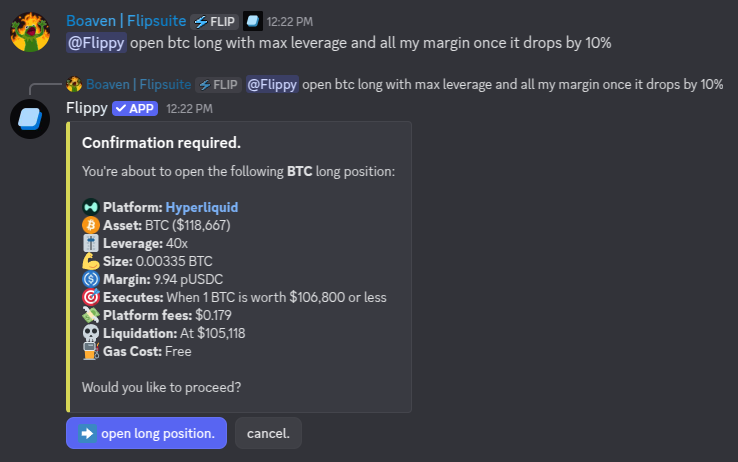
Opening a limit perp position on Hyperliquid
Setting multiple SL and TP levels
You can set multiple stop loss and take profit targets for your perp positions like this:Hey @Flippy open HYPE long with max leverage and $50 margin, set 50% TP at 10% gain, and 25% TP at 20%
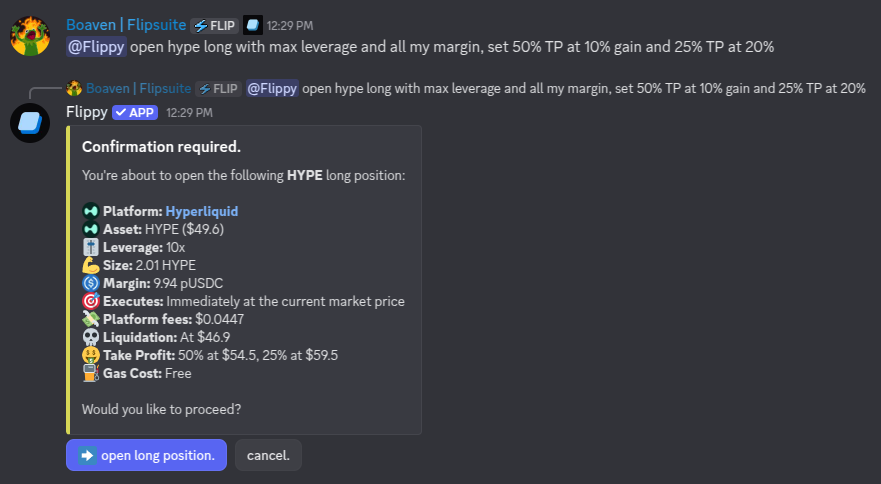
Placing multiple take profits on a perp position
Sharing your perp positions
You can ask Flippy to share one of your perp positions in the chat: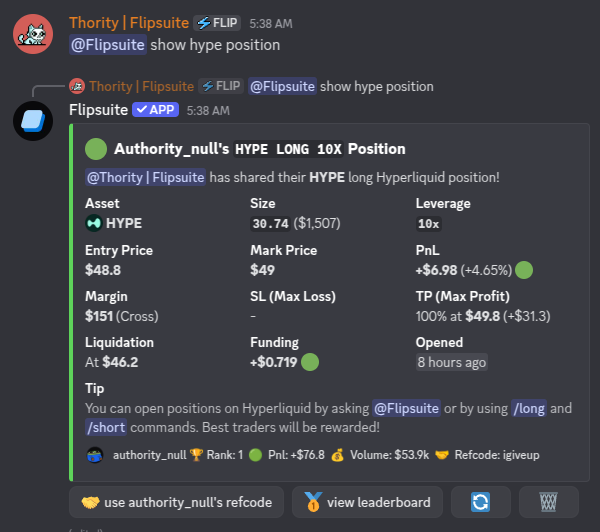
Sharing your Hyperliquid position in the chat
Closing your perp positions
You can fully or partially close your perp positions by asking Flippy to do so:Hey @Flippy cancel X% of my HYPE position
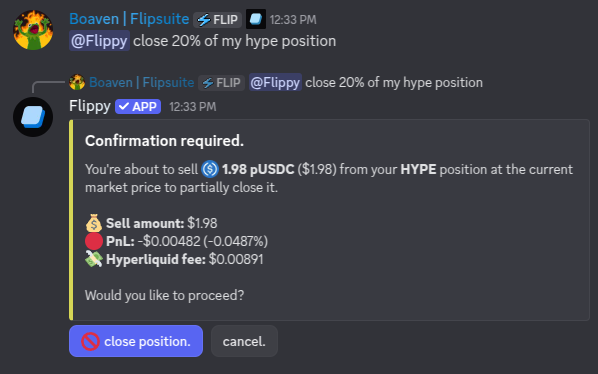
Closing a position partially
Trading leaderboard
All perpetual trades you execute on Hyperliquid using your Flipwallet are tracked on the trading leaderboard. Each week, the top 3 traders and the lowest-ranking trader (person at the bottom of the leaderboard) receive a reward proportional to the generated trading fees in that week. You can access the trading leaderboard at any time by asking Flippy: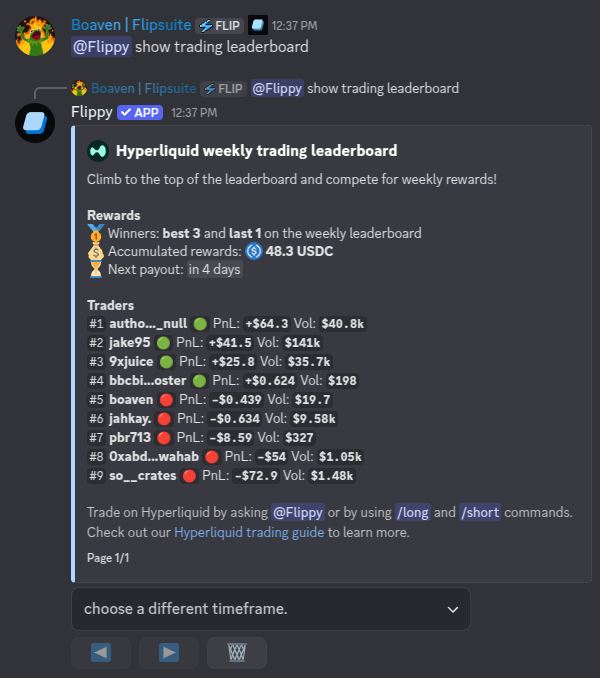
Hyperliquid trading leaderboard
Margin modes
When opening a perp position on Hyperliquid, you can choose between two margin modes:- Isolated
- Cross
Isolated margin
Isolated margin restricts the collateral for a position to a single asset.- Risk Isolation: Losses are limited to the margin allocated to that specific position. Liquidations in an isolated position do not affect your other trades.
- Manual Adjustments: You can manually add or remove margin from an open position to adjust your liquidation price (except for “strict isolated” assets).
- PnL Handling: Unrealized profits are applied directly to the position as additional margin.
Cross margin
Cross margin is designed for maximum capital efficiency.- Shared Collateral: All cross positions share the same collateral pool. This allows profits from one position to support the margin requirements of another.
- Liquidation Risk: Since margin is shared, a significant loss in one position can potentially lead to the liquidation of all other cross positions in your account.
- Automated PnL: Unrealized profits are automatically available as initial margin to open new positions.